Anaplan March 2024 Updates
Anaplan regularly updates the content and features of its platform. This is an opportunity for MeltOne to present these updates by putting them in context and illustrating them with application examples.
1. 🗓️ Planning and Modeling
A – Cascading Slides
This update allows you to quickly and easily create multiple linked slides from one or more slide dimensions.
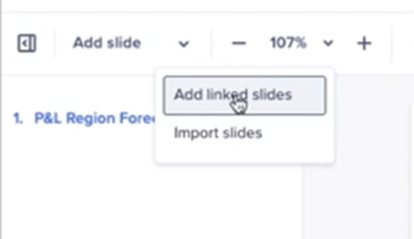
These slides are then created as linked slides based on the source slide. The interface enables you to generate these linked slides quickly and intuitively, facilitating the management of large presentations with linked data.
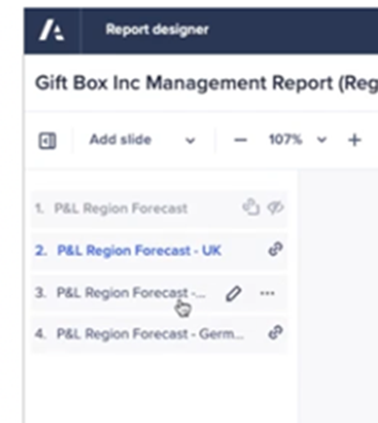
Hide Slides: The page creator can also hide any slide in design mode so that it is not visible when published. This is useful for hiding a source slide in a report.
B – Discontinuation of the “Return to Anaplan Classic” Feature
Anaplan now has a single modeling experience for all users and customers to reduce confusion and simplify our model-building experience.
C – Launch of the Beta Version of a New Modules View
Model builders have a new way to view, manage, and analyze modules within their models.
To access it:
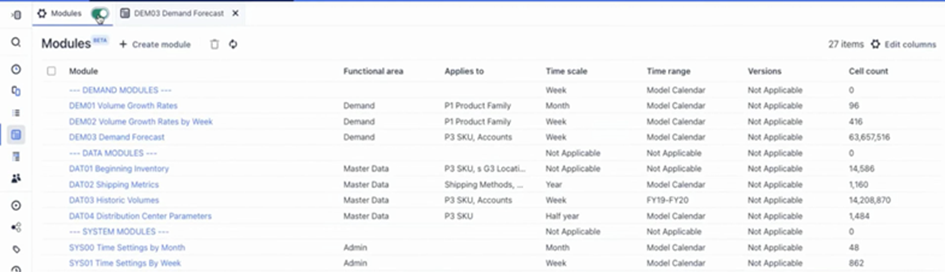
This view will allow you to better visualize, manage, and organize the model structure. This leads to better analysis, reduces the time to complete certain tasks, and enables more informed decision-making.
D – Anapedia Appearance in the Formula Editor
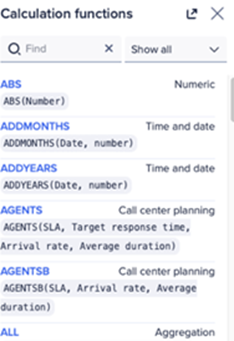
The option to access Anapedia directly from the formula editor is now available. This will provide access to detailed information about the various functions and formulas available on the platform.

By clicking on the ❔ icon that appears at the top of the formula editor tab, you can access the Anapedia documentation without leaving this tab, and you also have the option to copy the function with its syntax directly from Anapedia and paste it into your formula.
2. 👥 User Experience
A – Model Switching Update
The model selected in pages supporting multiple models is now retained when you navigate between pages. The selected model is retained as long as the navigated pages have the same models.
This can help with user experience ALM when navigating between pages with the development model selected or in any scenario where you use a page across multiple models.
B – Show/Hide Enhancements for End Users
In UX and dashboards, end users have the ability to right-click to Show/Hide, allowing them to apply an irregular selection and reorganize selected rows/columns on a grid.
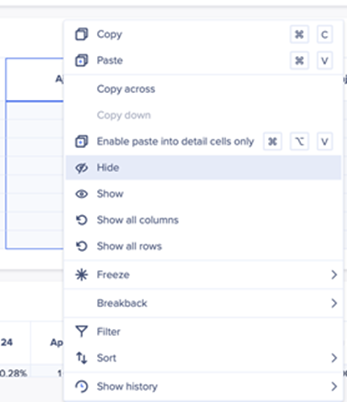
This update for UX aims to provide end users with more control and flexibility in managing data display in their Anaplan dashboards.
If you would like to learn more about these new features and have a demonstration, you can contact jsaccona@meltone.com.
Let’s discuss your challenges and our solutions
Let’s talk about your project and discover how MeltOne can turn your challenges into concrete, high-performing solutions.