Anaplan Workflows
This autumn, Anaplan unveils its new feature: Workflows. Available on both the website and the application, they offer the possibility to automate the planning process by automatically notifying users when an action is required from them. Automating task transfers and notifications improves efficiency by eliminating the need for manual interventions to complete planning processes. Workflow is designed to integrate seamlessly with existing systems, thus simplifying the user experience.
What are the benefits of using Workflow? What are the main use cases?
This article will reveal the main features already available, as well as an overview of the Workflow usage procedure.
AUTOMATE YOUR ROUTINES
Until now, users exchanged messages on other tools to inform their colleagues of task completion. This was a laborious process, leading to potential oversights and errors.
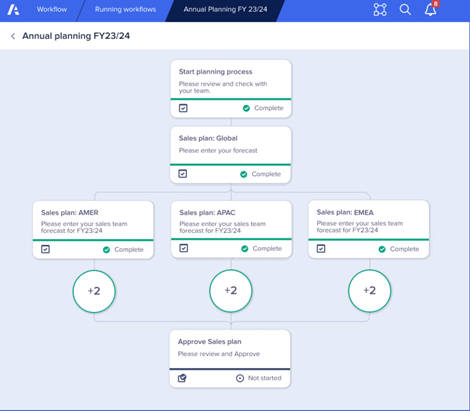
Thanks to Anaplan’s new Workflow, processes are now automated, eliminating the need for central teams to constantly monitor progress, while making certain elements of the planning process more repeatable and reliable. A routine can, for example, be integrated and reproduced every month.
The Anaplan Workflow feature thus optimizes planning efficiency by allowing you to coordinate tasks across teams, obtain approvals from everyone, and transparently track progress.
NOTIFY YOUR USERS
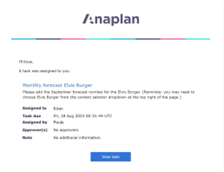
Users receive a notification (email, website, and application) that redirects them to the specific Anaplan page where their work needs to be done.

Clear and precise instructions explaining the task to be completed, along with the deadline and responsible party, are available on the page. This allows the user to begin their task with all necessary information.
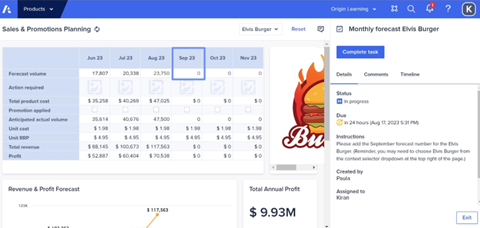
Once completed, they have the option to add annotations to provide other planners in the forecasting cycle with the necessary context for decision-making. These annotations promote instant and integrated communication, facilitating collaboration without leaving the work interface. Each user thus becomes autonomous in their work, receiving reminders without any action from their colleagues.
TRACKING ACHIEVEMENTS
Finally, clearly defined action buttons and seamless integration with the Anaplan mobile application allow managers to easily review everyone’s annotations, check crucial figures, and approve or reject work, all in real time.
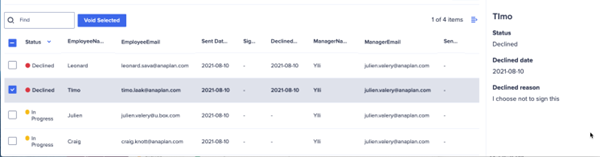
This includes the ability to reassign tasks, force task completion, cancel approvals, and reopen work. These actions help maintain process fluidity, even in cases of exceptions or delays.
The introduction of Anaplan Workflows represents a major advancement in the field of planning and process management. This automated functionality streamlines operations by eliminating tedious manual tasks, minimizing the risk of errors, and ensuring transparent coordination between teams. It offers increased visibility into progress, thereby enhancing operational efficiency and planning quality. Anaplan Workflows are a valuable asset for improving productivity and process reproducibility within organizations.
Overall, this new Anaplan feature adapts to a variety of business processes, such as sales planning, budget approval, demand planning, financial operations, and sales and promotion planning. Companies adopting Anaplan Workflows can anticipate a significant improvement in their operational efficiency and their ability to make informed decisions.
The MeltOne team is available to answer any questions or provide a demonstration. You can contact us directly via the following email address: jsaccona@meltone.com
Let’s discuss your challenges and our solutions
Let’s talk about your project and discover how MeltOne can turn your challenges into concrete, high-performing solutions.