What’s new in Power BI?
DISCOVER THE NEW POWER BI FEATURES IN 2023 FOR EVEN MORE POWERFUL DATA ANALYSIS!
If you are looking for a powerful tool to transform your data sources into impactful and interactive insights, then Power BI is for you. Whether you are a novice or an expert in data analysis, Power BI offers you the ability to explore and analyze your data efficiently.
Microsoft continues to innovate by regularly offering new features and improvements to make Power BI even more powerful. Let’s take a look at the latest Power BI updates in 2023, designed to facilitate your journey into the world of data analysis.
New features:
- New comprehensive analytics platform FABRIC
- Storytelling in PowerPoint – New style option
- View visualization in Power Apps with Power BI quick report
- The Power BI mobile app offers an enhanced experience
- Multiple audiences for Power BI apps
- Improved data connectivity
1. New comprehensive analytics platform
Fabric is a comprehensive analytics platform that meets all of an organization’s analytics needs. Unlike other products on the market, Fabric integrates all useful subsystems without requiring the purchase of additional products. For more information, please read this article.
2. Storytelling in PowerPoint – Integrate visuals from organizational Power BI apps
This feature allows you to integrate visualizations from your organizational applications directly into your PowerPoint presentations. With a simple link, you can seamlessly embed powerful visualizations into your slides, creating a captivating storytelling experience.
This integration between Power BI and PowerPoint allows you to effectively communicate your data-driven insights and captivate your audience with visually impactful content. Elevate your presentations with Power BI’s enhanced storytelling and bring your data to life like never before.

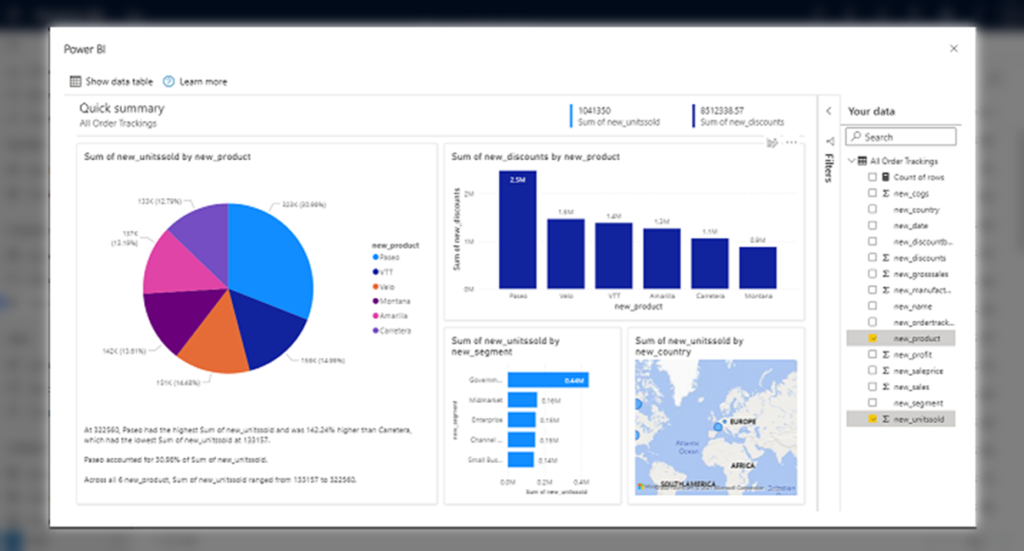
3. View visualization in Power Apps with Power BI quick report
The Power BI quick reports feature in Power Apps allows you to easily discover insights from your data directly within your business applications.
This feature is now enabled by default in the 2023 version, offering seamless integration between Power Apps, Power BI, and Dataverse. Users can create interactive and visually appealing reports based on their business application views and save them to the Power BI service.
4. The Power BI mobile app offers an enhanced experience
Improved tooltips in the Power BI mobile app:
Tooltips on visualizations. (By holding your finger on a data point, you get an elegant and user-friendly tooltip that allows you to navigate and perform actions such as drilling down and detailing. Tooltips can also be customized by the report creator to offer a unique experience.)
Hierarchies in the Power BI mobile app:
Hierarchies are now supported in the Power BI mobile app, making it easier to explore data at different levels. You can perform in-depth analysis and check the status of your data at various levels of detail. The new hierarchies feature allows you to display progress, statuses, and perform checks at different levels of your dataset.
External content discovery in the mobile app:
Accessing external content from the Power BI mobile app is now easier. You can find and access your external content directly from the app, without needing an external link. This feature allows you to view and interact with data shared by external organizations.
5. Multiple audiences for Power BI apps
The multiple audiences feature for Power BI apps is now generally available. It allows app authors to create multiple audience groups within the same app and assign specific permissions to each group.
This feature offers more flexibility and control in managing app access permissions.

6. Improved data connectivity
Updates for Oracle, Azure Databricks, Databricks, SurveyMonkey, Denodo, Digital Construction Works Insights, Profisee, and Cosmos DB V2 database connectors have been released to improve connectivity to various data sources. These updates facilitate the integration of your data from various platforms into Power BI.
Conclusion:
The new features in Power BI for 2023 offer an enhanced data analysis experience, making data exploration and visualization more accessible and powerful than ever. Whether you are a novice or an expert in data analysis, Power BI helps you transform your data into actionable insights to make informed decisions. Feel free to explore these new features and integrate them into your data analysis process.
You’ve had an overview of Power BI updates and their uses. Do not hesitate to contact us if you need more details or have questions about this new version at the following addresses ybusidan@meltone.com / jsaccona@meltone.com.
Feel free to share your thoughts in the comments below. We would love to hear from you.
To continue reading and discover MeltOne news, go here.
Let’s discuss your challenges and our solutions
Let’s talk about your project and discover how MeltOne can turn your challenges into concrete, high-performing solutions.