Anaplan January 2024 Updates
Anaplan regularly releases updates to the content and features of its platform. This is an opportunity for MeltOne to present these updates by putting them in context and illustrating them with use cases.
1. Scatter/Bubble chart power Trend Line
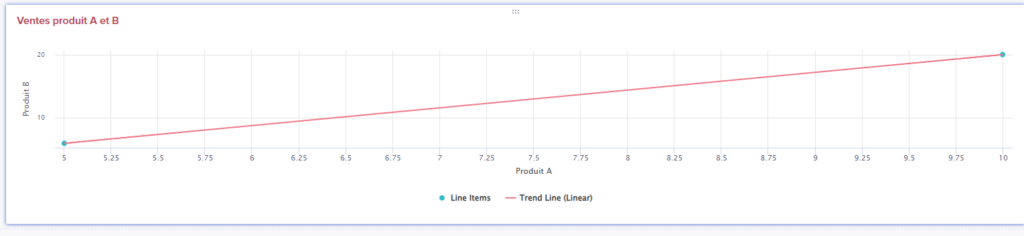
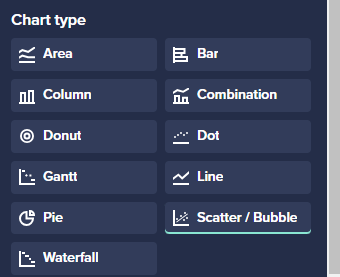
A new chart type has been added: the Scatter/Bubble chart, which allows you to visualize the relationship between multiple variables in a chart.
Use case: I want to visualize the nature of the relationship between my sales of product A and B to determine whether the two products are complementary and whether they sell together or not.
In this example, you can see in the chart that an increase in sales of product A generates a linear increase in sales of product B. Products A and B could be a mobile phone and a charger, for example. The two goods are complementary, and the chart allows you to visualize this.
2. Restore a deleted page
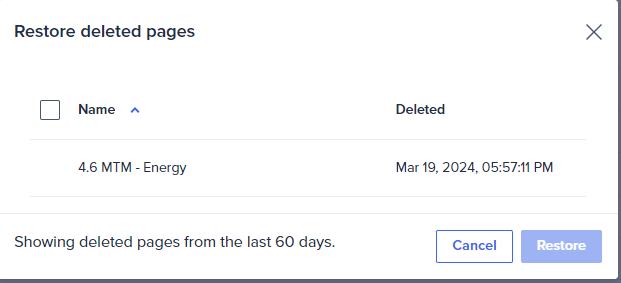
It is now possible to restore any deleted page up to 60 days after deletion. Deleted pages are organized under a new category in the top right of the application’s main menu page.
Use case: I want to restore a page that was deleted by mistake by a Page builder.

3. Chart Drill Down
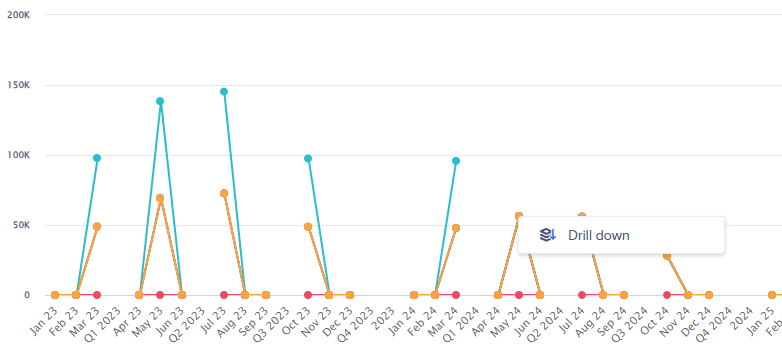
End users can now drill down to data sources in charts by right-clicking on the value point in the chart. This feature was initially reserved for grid cards.
If you would like to learn more about these new features or have a demonstration, contact jsaccona@meltone.com
Let’s discuss your challenges and our solutions
Let’s talk about your project and discover how MeltOne can turn your challenges into concrete, high-performing solutions.