S/4 HANA and data migration
Since launching its S/4HANA suite, SAP has made a new data migration tool available: the SAP Migration Cockpit. Initially, this tool was designed to assist users with their migration to SAP S/4HANA Cloud Edition. In this Greenfield-to-cloud-edition context, the SAP Migration Cockpit is the only migration tool available.
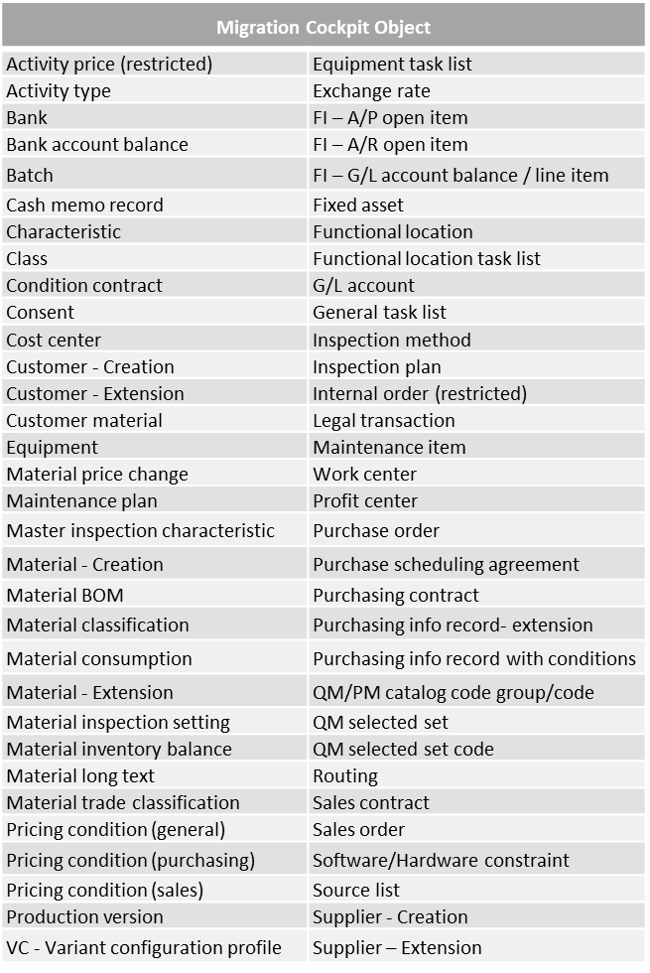
However, SAP has continued to enhance this tool’s features, to the point that since the release of S/4HANA version 1610, users who choose the On-Premise edition can also benefit from it. And for good reason: this Migration Cockpit, whose transaction code is LTMC, will ultimately completely replace the legacy data migration tool, LSMW (Legacy System Migration Workbench). With each update, it enables the migration of an increasingly broad range of data. Below is the list of data currently covered by the tool (S/4HANA 1809):
1. Data Migration, Fiori style
What’s new? First of all, the Migration Cockpit is entirely based on the new Fiori user interface, the flagship of the S/4HANA suite.
From a usability standpoint, it must be said that this new tool lives up to its name as a “cockpit”. The Fiori screens are packed with all kinds of indicators: you will find a full range of different progress statuses for migration projects, progress bars for each program run, each migration object is associated with rather useful documentation (business rules, dependencies on other migration objects, etc.), and all of this remains quite attractive and readable for the user. This is a major step forward compared with LSMW, whose “aging” interface was, to say the least, sparing with information.
From a technical standpoint, it should be noted that these Fiori screens are only accessible via a web browser. As a result, users of the On-Premise version of S/4HANA will need the necessary infrastructure to access the Migration Cockpit. Failing that, they will have to fall back on LSMW, which remains usable in S/4HANA but is no longer maintained by SAP.
However, the new features of this Cockpit are not only ergonomic; they also have real methodological appeal.
2. Simplified and streamlined data migration
Indeed, the Migration Cockpit effectively limits the risk of error through various checks performed natively. From now on, the data migration templates (spreadsheets in which the data to be created is entered) are designed and provided directly by SAP, for each migration object (Screenshot 1). They contain the list of all standard fields and even include some very useful business rules: they indicate whether a field is mandatory or optional, date formatting is assigned directly to the cells, etc. All that remains is to fill them in and upload them.
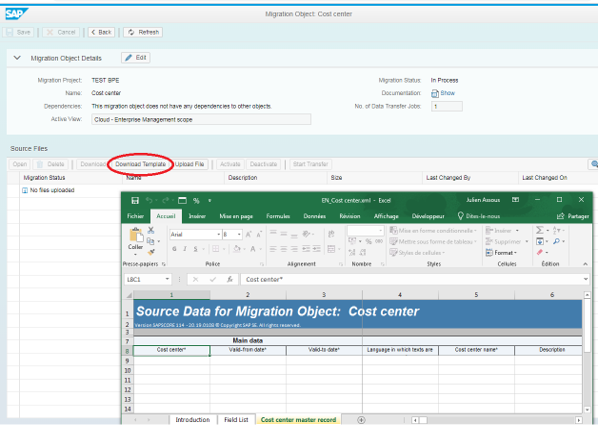
Screenshot 1
Once the data has been uploaded into the tool, it is analysed. The rest of the process differs from the legacy LSMW tool. In the old tool, the mapping between source (Legacy) data and target (SAP) data was configured manually by the user. Admittedly, this allowed a certain degree of flexibility, notably thanks to the ability to add lines of ABAP code, the SAP language, for example to handle format differences. However, this step was also a risk factor because it was often too complex, not very reusable, and relied on an old technology.
With the Migration Cockpit, the mapping between the entered values and the fields configured in SAP is performed automatically. However, the user retains oversight, as they must manually confirm that this mapping is correct (Screenshot 2). In short, one of the most complex steps of data migration can now be completed in just a few clicks, with no errors at all.
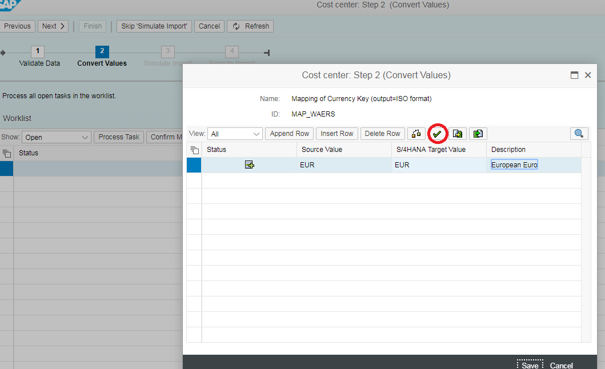
Screenshot 2
The migration technology has been streamlined. Migration programs are now all of the same nature. LSMW’s heterogeneous migration methods (Direct input, Recording, Idoc, etc.) give way to a range of standard BAPI programs, each dedicated to a single migration object, all executed in the background. A single transaction, SM37, can now be used to check that they run correctly. If necessary, these programs can be viewed via the single transaction LTMOM. In this way, more advanced users can retrieve useful information from a handful of summary screens, regardless of the project.
3. The modularity of the Migration Cockpit
The list of objects managed by the Migration Cockpit already constitutes a fairly comprehensive catalogue, especially since version 1809. However, if it does not cover all needs, users of S/4HANA On-Premise or S/4HANA Cloud versions (exclusively on a private cloud) have additional options thanks to the Migration Object Modeler. This feature, accessible via transaction LTMOM, can be used to manage objects that are not in the list. It also makes it possible to customise existing standard programs. However, in this case, only the addition of new fields is permitted; deleting or modifying existing standard templates is not possible (Screenshot 3).
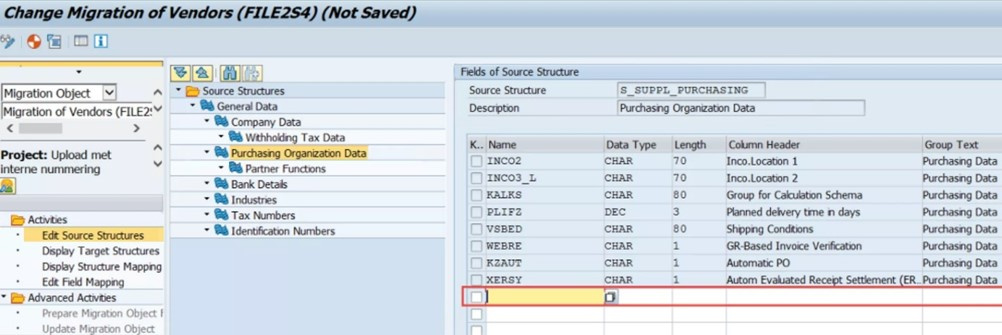
Screenshot 3
Simplified, redesigned and standardised, while remaining customisable, this Migration Cockpit is therefore a major asset of the S/4HANA suite.
Are you ready to move to S/4?
Do you need assistance to deliver a successful data migration? Are you looking for expertise on SAP S/4HANA? With extensive experience in Data Migration, both in a Core Model rollout context and in S/4HANA Greenfield implementations, MeltOne Advisory can help you successfully deliver your projects. Please do not hesitate to contact us at: jsaccona@meltone.com. We will be pleased to get back to you as soon as possible.
Let’s discuss your challenges and our solutions
Let’s talk about your project and discover how MeltOne can turn your challenges into concrete, high-performing solutions.