SAP Analytics Cloud Q4 2025: What’s New
With its Q4 2025 release, SAP Analytics Cloud (SAC) continues to accelerate its transformation by offering a platform that is increasingly modern, high-performing, and user-centric. This new version focuses on the unification of experiences thanks to the Horizon theme, now at the heart of SAP design, as well as a significant improvement in planning and analysis capabilities. Between the introduction of new optimized interfaces, personalized tracking tools like My Metrics, and a smoother integration of real-time data, SAC reinforces its ambition: to offer an agile, coherent analytical environment perfectly aligned with the operational needs of organizations. Through these evolutions, the solution gains clarity, speed, and efficiency, once again transforming the way users interact with their data.
1. New Horizon Theme
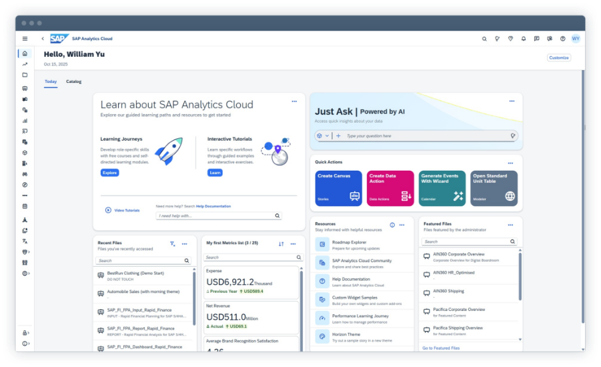
SAP Analytics Cloud gets a makeover with its new Horizon theme. It enables a more intuitive user experience and puts fluidity and modernity at the heart of its project. This also allows for the creation of a cohesive theme across all SAP tools.
With the Q4 2025 release, the Horizon theme is now part of the SAP Fiori design strategy, offering a modern, clear, and uniform interface, in line with the latest SAP ergonomics guidelines.
The theme is activated via user profile settings, but administrators can also deploy it globally for all users, facilitating an interface homogenization across the company.
2. My Metrics
The new SAC functionality “My Metrics” now allows each user to benefit from a personalized space to track their most strategic key indicators. Thanks to My Metrics, it is possible to:
- Create and name metric lists by theme or business use;
- Add or remove indicators as priorities evolve;
- Organize the display by changing the order of metrics to highlight the most important ones;
- Refresh data in one click directly from the list to ensure the most recent information is available;
- Access the original story of an indicator to explore the full context and perform an in-depth analysis;
- Share or collaborate around metric lists, thus facilitating team alignment on the same KPIs.
My Metrics thus reinforces the adoption of SAP Analytics Cloud by focusing on the essentials, while giving business teams simplified, fast access perfectly adapted to their strategic needs.
3. Seamless Planning
SAP Analytics Cloud is attractive for its ability to visualize and analyze large volumes of data in real time thanks to the live data model. But it is also widely used for its planning functions. Previously, these two aspects could not be combined. But all that changes with the new evolution of Seamless Planning, which offers two new features.
- It is possible to create a planning model based on real-time SAP Datasphere data. Allowing users to model and adjust their forecasts directly on updated data, without disruption between analysis and execution.
- You will also be able to schedule the publication of a story based on a live SAP Datasphere connection. This automation simplifies the distribution of consolidated reports integrating always up-to-date data.
SAP Analytics Cloud now unifies real-time and planning, offering EPM teams a more agile and integrated solution, aligned with operational needs.
4. Working Days in the Calendar
This new feature introduced in SAP Analytics Cloud allows for the scheduling of tasks and processes by taking into account the company’s actual working days.
By defining a property in the “DATE” dimension indicating working days, SAC can execute recurring tasks only on those days — thus avoiding triggers during public holidays or closure periods. This new feature reinforces scheduling reliability, aligns automated processes with operational reality, and improves overall management consistency.
5. New Performance Analysis Story
An update to stories makes it easier to maintain a larger volume with increased performance. This new interface allows for building tables more intuitively, with better data synchronization and improved filter control. All this makes it possible to track growth trends, correlate peaks with system actions, and take proactive actions before reaching system limits.
With the Optimized Story Experience, content in an SAC story loads faster, which significantly improves performance for end users.
SAP notes, however, that some functions are not yet fully supported in this optimized experience, but the tool continues to evolve, and restrictions should be gradually lifted.
Furthermore, Q4 2025 introduces performance statistics (“Performance Stats”), which allow for analyzing load times, identifying bottlenecks, and optimizing stories for smoother rendering.
In order to use it, you can activate it manually in the story. Be careful, however, as the change can have irreversible effects on the entire story.
Let’s discuss your challenges and our solutions
Let’s talk about your project and discover how MeltOne can turn your challenges into concrete, high-performing solutions.