Anaplan February 2024 Updates
Anaplan regularly performs updates to the content and features of its platform. This is an opportunity for MeltOne to present these updates by putting them in context and illustrating them with use cases.
1. 🗓️ Planning and Modeling
a – Detailed History
The change history is now much more detailed and precise. This is particularly useful for better project traceability, especially in contexts where precision is important, or in projects where we have multiple Model Builders making changes simultaneously. This will facilitate verification and auditing of changes made.
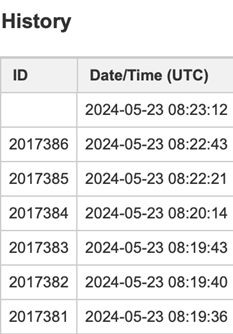
It is now possible not only to view the day but also the exact time at which each change was made.
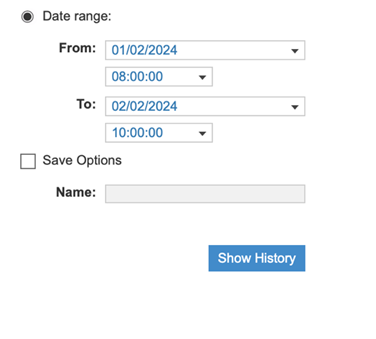
A new way to search the history, rather than viewing all changes that have been made, using a time range. You can now search for changes made between 2:15 PM and 2:30 PM on a specific day, for example.
B – User List Enhancement
Model Builders can now enable an option that allows using a total for the user list. This will make using this type of data easier and more flexible across different modules.
Among other things, you can use native aggregation methods in Anaplan (SUM, AVERAGE, MIN, MAX, etc.) that will allow you to obtain the level of granularity you need, to group and summarize data across different dimensions.
Use Case:
This option will be useful when using Anaplan to track user activities such as project management, workforce planning, or sales activities.
2. 👥 User Experience
A – Gantt Chart Update
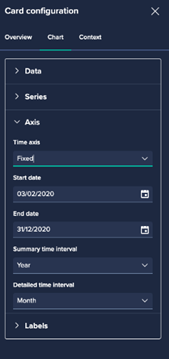
- The timeline automatically adjusts based on available data and the current view.
- You can manually set a start date and end date for the timeline. For example, from January 1 to December 31.
- Define a time interval around the current date. For example, display the 6 months before and 6 months after the current date.
- Choose between a single or double timeline header
- Choose timeline intervals (day, week, month, year)
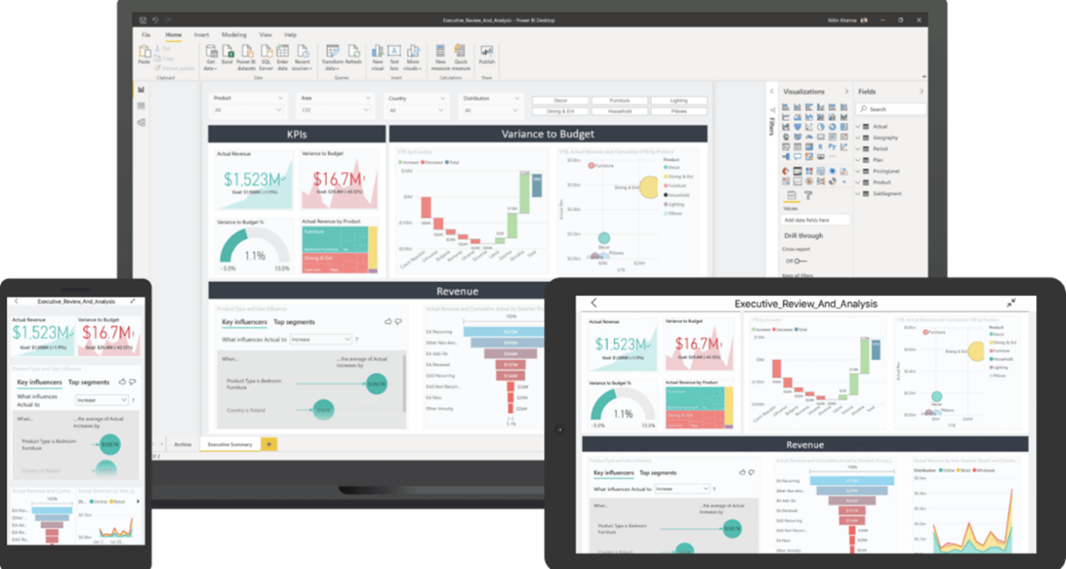
B – Enhanced Context Management with Dynamic Notification Actions
Actions will be analyzed when the page loads and will add any missing context selectors to the page. Anaplan detects that the notification action will require context selectors for the project manager and region, for example.
Once everything is configured correctly, you can send the notification without having to go through an additional pop-up window.
Benefits:
- Efficiency: Reduces the need for additional pop-up windows, making the process smoother and faster.
- Clarity: All necessary context selectors are visible and can be adjusted directly on the page. This provides better visibility and control.
- Preparation: Ensures that all required information is available and configured correctly before triggering an action.
C – Drill Down Functionality on Charts
The drill down functionality is now available using the “F8” key, for chart data points as well as grid cells. This will allow you to identify and analyze its composition or which formula was used for the calculation.
3. 🌍 Geo-mapping
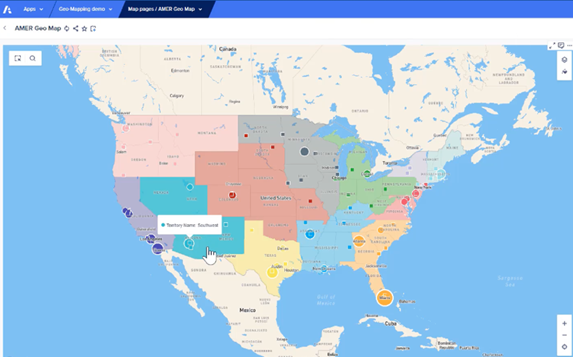
We have extended our boundary coverage to Administrative Level 2 for the regions below.
- United Arab Emirates
- South Africa
- Austria
- Poland
- Croatia
- Czech Republic
- Hungary
Administrative levels vary from country to country, but generally, Administrative Level 1 is the highest (such as states or provinces), and Administrative Level 2 is more detailed (such as counties or districts).
4. 🔒Security
SCIM API Keys for Integration with Azure AD
API keys are a new authentication method for users, services, or applications seeking to access SCIM APIs. This approach protects sensitive data and prevents unauthenticated access. It provides an additional layer of security.
Each user or service receives a unique key that must be used to access the SCIM API. This provides a secure and controlled method for managing access to identity data, prevents unauthenticated access, and adds an additional layer of security.
If you would like to learn more about these new features and see a demonstration, you can contact jsaccona@meltone.com.
Let’s discuss your challenges and our solutions
Let’s talk about your project and discover how MeltOne can turn your challenges into concrete, high-performing solutions.