The new CCH Tagetik feature: RED: “Rules Engine Designer”
The new CCH Tagetik feature, RED: “Rules Engine Designer” has been available for a few months, and it takes Consolidation on CCH Tagetik to another level (more than it already was!). This confirms the trajectory taken by the publisher over the last few years regarding the Consolidation module, and the resources implemented to position itself as a key player in Statutory Consolidation.
But what is RED?
It is a feature, launched several versions ago and constantly enhanced, which allows for the creation of consolidation rules using all necessary elements in a simplified and intuitive way, with a very precise definition for source data, trigger conditions, and the processing to be applied. Some details below:
Trigger condition:
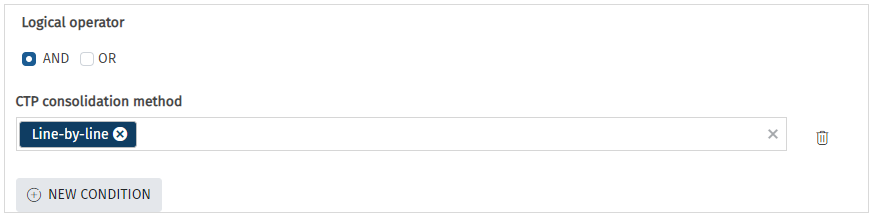
- Consolidation method: type of entity method to trigger processing (IG, IP, MEE)
- Application on the Holding company, subsidiaries, or both
- Processing to be triggered on the opening or on the period
- Sign handling
Processing to be applied:
- Ability to manage dimensions: dimension swapping, particularly for the partner
- Ability to apply a mark-up
- Ability to apply “multi-triggering” (i.e., the same entered amount can trigger multiple processes)
- Source account mapped to the target account
- Source category mapped to the target category for the audit trail
What are the benefits?
Easy to use for a Consolidation administrator, RED allows for the intuitive creation of new Consolidation rules with detailed processing control. The maintenance of Consolidation rules as well as the creation of new rules is completely in the hands of a Consolidation administrator.
Something concrete for Consolidators: Example of a Goodwill elimination rule
Description of the processing to be produced:
- Source data / Trigger: entry of the holder of the goodwill in relation to the owned subsidiary (entered as a counterparty)
- Processing: at the subsidiary level, populating the Goodwill account, offset against consolidated reserves
Implementation via the RED feature to achieve this result:
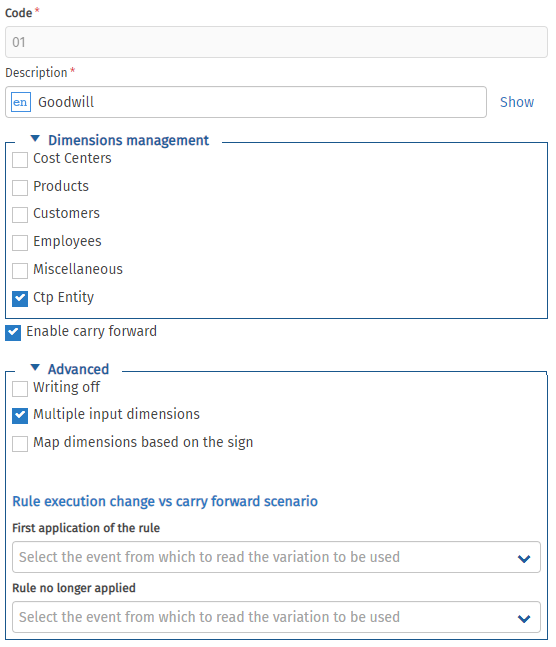
- Creation of a “Goodwill” rule
- Activate “multi-triggering” to generate entries on the Goodwill and Reserves accounts
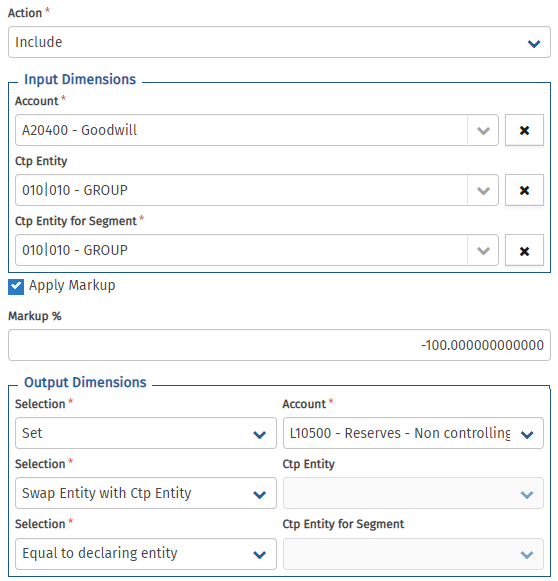
- Create the 2 lines with the Goodwill account as the source, and map it to the Goodwill account as well as the Consolidated Reserves account
- Apply a mark-up to reverse the amount on the line generating in Reserves
- Apply the entity/partner swap so that the rule is generated at the partner level
The key takeaway?
Creating a new elimination rule (as in the GW case above) intuitively—yes, it is possible with RED!
Do not hesitate to contact us at jsaccona@meltone.com for more information on this subject.
Let’s discuss your challenges and our solutions
Let’s talk about your project and discover how MeltOne can turn your challenges into concrete, high-performing solutions.